

Hosting your club’s own swim meet is an exciting opportunity, and Swimming Wide Bay is here to help your club with the resources and support needed to host successful, competitive meets year-round. This page is designed to be an information hub to help your club easily apply for, renew, and manage swim meets across the Swimming Wide Bay region.
A successful swim meet takes more than simply adding it to the calendar. Building relationships with other clubs, communicating with coaches and actively promoting your meet can make a significant difference to participation.
See ‘9-Step Meet Hosting Process / Step 3 – Promoting your Swim Meet’ below for tips on getting your meet in front of clubs, coaches and swimmers across the region.
If your club is new to hosting a meet, here is some useful background information:
Hosting a meet elevates your club’s presence in the swim community, rallying your committee, volunteers, swimmers, and families around a shared goal. It also offers sponsors a chance to gain visibility among a wider audience in the Wide Bay area.
Club meets can provide valuable income from event fees, entry charges, BBQs, and raffles. Clubs have the flexibility to set their own event fees, and can choose to incorporate door entry fees into their entry fees if desired.
Swimming Queensland classifies competitive meets into three categories: Development, Transition, and Preparation. Each meet type has different requirements, tailored to the needs of swimmers and host clubs. Here’s a quick overview of the different meet types:
For beginner-level swimmers.
Development Meet Synopsis [PDF]
For intermediate skill levels:
Transition Meet Synopsis [PDF]
For advanced swimmers gearing up for larger competitions:
Preparation Meet Synopsis [PDF]
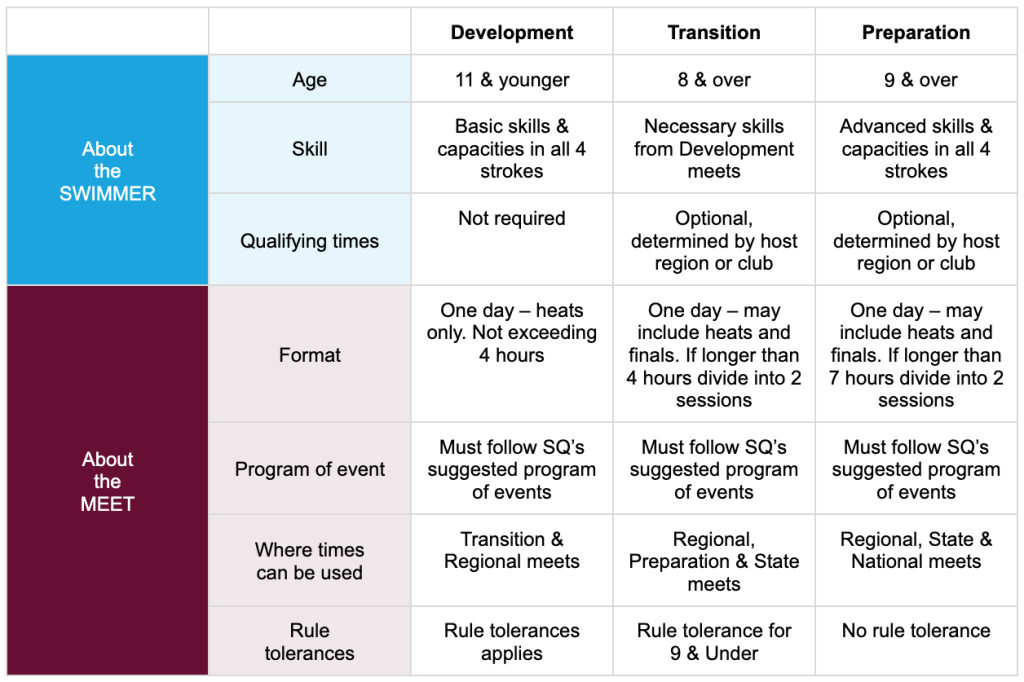
Refer to the Swimming Queensland Competition Policy [PDF] for full details on competition guidelines.
Choosing the right meet type for your club is important. Consider these factors when selecting the right meet type for your club.
One of the key differences between the meet types are the age groups involved. If your club has a lot of younger swimmers, your club may be better suited to hosting a Development meet, whereas clubs with swimmers who are mainly older should look at hosting either a Transition or Preparation meet.
Different meet types run for different durations, and so vary in terms of the amount of Technical Officials and volunteers to safely run them.
Each year Swimming Wide Bay will distribute a Host Club ’Expressions of Interest’ form for clubs to apply for their preferred meet dates for the upcoming swimming season. This form is distributed to clubs in December of each year, with expressions of interest closing generally by mid-January of the following year. Clubs will be notified of their allocated meets with a confirmation email by end February.
In the Host Club ’Expressions of Interest’ form your club will be asked:
You will be asked for your top 3 meet date preferences. Please note that from time to time Swimming Wide Bay may request a date change to optimise the overall meet calendar spacing for swimmers.
Confirm if you need assistance to hire equipment or source an operator for the day.
Confirm who your club has available to officiate at your meet, and which roles you require assistance from Swimming Wide Bay to source.
For beginner-level swimmers.
Development Meet Synopsis [PDF]
For intermediate skill levels:
Transition Meet Synopsis [PDF]
For advanced swimmers gearing up for larger competitions:
Preparation Meet Synopsis [PDF]
After successfully being selected to host a SWB Club Meet, clubs must submit their proposed meet flyer to SWB for approval no later than 10 weeks prior to their meet, for transparency to allow swimmers and coaches the ability to plan.
Please submit your meet flyer to:
President@widebayswimming.org.au and
hello@widebayswimming.org.au
for approval.
Having your meet listed on the calendar doesn’t automatically mean swimmers will come. A successful meet needs active promotion and, importantly, good communication with clubs and coaches across the SWB region.
Strong relationships between clubs benefit everyone. Get to know neighbouring and broader-region clubs, communicate regularly, and support each other’s meets where possible.
Well before your meet, reach out to other clubs and coaches to let them know what you have coming up. Open conversations can help clubs plan their calendars, encourage swimmer participation and create a culture where clubs actively support one another’s events.
Don’t wait until nominations are about to close to start the conversation.
Once your meet is live and ready for nominations, email the Swimming Wide Bay Secretary and let us know.
SWB can check that your meet is visible across all Swimming Wide Bay regions and help promote it through our communication and social media channels.
Promote your meet directly to clubs and coaches across the region. Send an email introducing the meet, highlighting anything that makes it different or particularly useful for swimmers, and include the meet flyer and nomination information.
Swimming Wide Bay maintains Club and Coach mailing lists to help host clubs communicate across the region.
Contact the SWB Secretary to request the current Club and Coach mailing lists.
Remember, putting a meet on the calendar is only the first step. Tell people about it, talk to other clubs and give them a reason to put your meet on their calendar too.
In order to run your meet on the day you will need to set-up your meet in Meet Manager (MM) and load the event into Swim Central. You will also need to upload your Meet Flyer to Swim Central prior to your event going live.
Online meet entries are required to open 3 weeks prior to nominations closing, and can be earlier if the host club wishes.
The Meet Manager BackUp File (zip file) must be emailed to Swimming Wide Bay one day after close of nominations for your meet and at the completion of the meet.
Please don’t hesitate to contact us for help with creating your meet in Swim Central. We strongly encourage all clubs to contact us prior to publishing their meet, to assist you with checking to ensure everything runs as smoothly as possible.
Upon approval to run your meet, the Swimming Wide Bay region will appoint a qualified Referee to your meet. In the lead-up to your meet, your Chief Referee will be in contact to confirm which Lead and Support TOs your club has, and which ones you require SWB to provide. Reimbursement of any SWB-supplied Lead TOs is expected on the day of your meet.
To relieve financial and recruitment pressures on clubs, Swimming Wide Bay announced it is reducing the mandated number of database-supplied accredited officials required on deck for club meets.
Old Policy: Seven (7) mandatory technical officials.
New Policy: Reduced down to four (4) Mandatory Accredited Roles (immediately effective):
The Chief Timekeeper and roles like Check Starter or Marshal can be supplied internally by the host club, provided the parents have a clear history/understanding of the job or have taken the online Community Officials Education (COES) course. See ‘Support Technical Officials (Volunteer Positions*)’ tab below.
However, because infractions can be legally challenged by parents, the core 4 roles must remain fully accredited. If a club’s rostered officials fall ill or fail to show on the day, the meet will not be allowed to run. Alternatively the roles can be filled by a SWB accredited TO and charged to the swim club.
Matthew Robinson will continue to email club presidents/coaches one month out from scheduled events to audit rosters, finalise the checklist, and confirm exactly what the billing rates for regional TOs will look like.
The below roles can be supplied internally by the host club, provided the parents have a clear history/understanding of the job or have taken the online Community Officials Education (COES) course.
Making it easier for clubs to engage their volunteer community & manage meet costs.
Although there are no formal training requirements for these positions, we do encourage people interested in these Support TO roles to become accredited. This will enable them to be eligible to officiate and be remunerated at our Swimming Wide Bay championship events
Running a successful Swimming Wide Bay meet requires the right timing equipment and a qualified operator. Here’s what you need to know:
Different meets have different timing needs:
Need timing equipment or an operator? Here’s how to get help:
When hosting long-distance events such as the 800m and 1500m races, please remember that Swimming Wide Bay has physical lap counters available for use. These are shared resources, so it’s important that hosting clubs collect the counters from the previous club that hosted a distance meet and ensure they are ready for the next event. This way, every swimmer gets the best race-day experience, and the equipment continues to circulate smoothly between clubs.
To ensure Swimmers, Parents/Caregivers, Clubs, and coaches have enough time to prepare for your Swim Meet, please note the following requirements:
Please follow the below link in order to upload your final meet program (in PDF format) and your Meet Manager Backup Backup File (zip file). This must be emailed to Swimming Wide Bay one day after close of nominations for your meet and at the completion of the meet.
NOTE: after you have sent this program – NO CHANGES CAN BE MADE WITHOUT APPROVAL OF THE CHIEF REFEREE
Other document(s) you must print off and utilise on the day of your swim meet are below. These must be submitted with your results files as part of Step 8.
This must be completed by the Referee and Meet Director prior to the commencement of the meet, and the completed document emailed to hello@widebayswimming.org.au.
Checklist PDF here:
https://drive.google.com/file/d/11XUcd1daPQG52iqaJaft_8CHBubBM7oe/view
The PDF results file must be emailed to qldresults@qld.swimming.org.au and hello@swimmingwidebay.org.au at the completion of the meet along with the Meet Manager BackUp File (zip file).
You will still need to upload your results to Swim Central – if you are unsure how to do this, read HERE.
The following documentation is required to be uploaded: